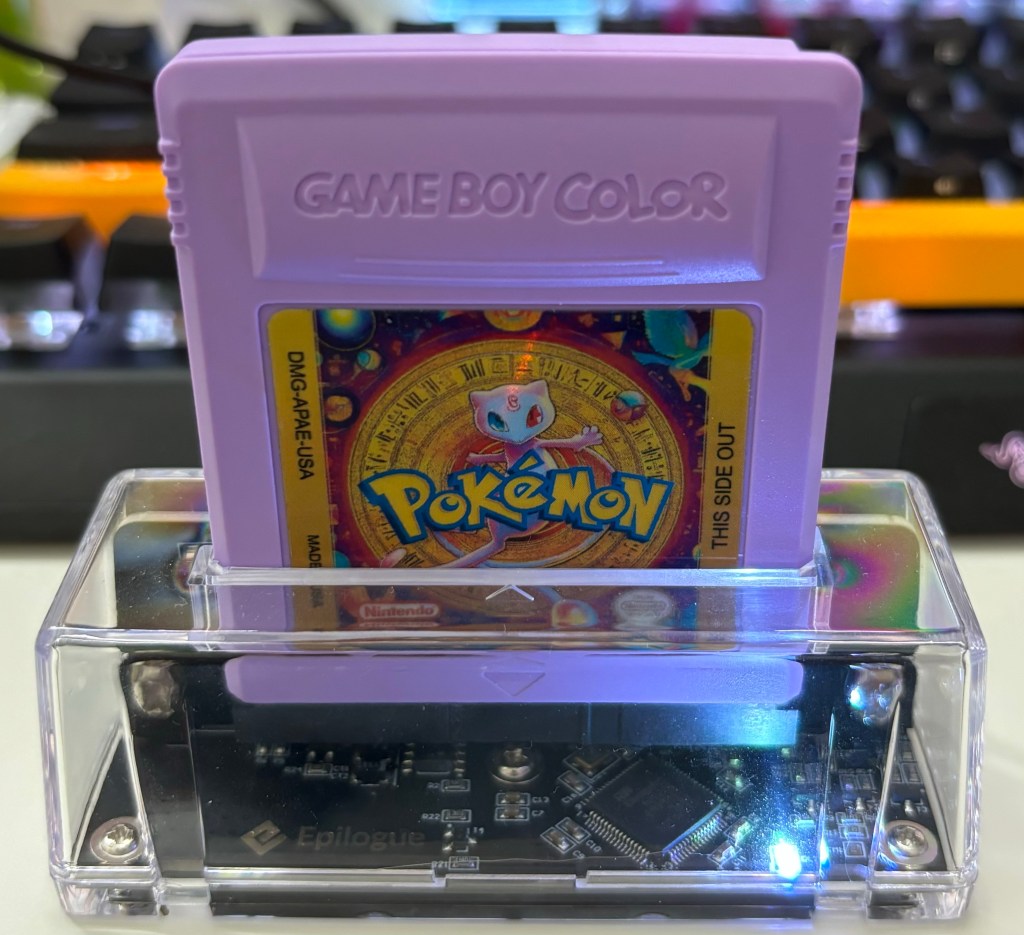

For those of us old enough to remember when Pokémon Red and Blue were released, surely we also remember the rumor that Mew could be found underneath a random truck near the S.S. Anne in Vermilion City. Many of us probably spent time trying to find Mew with no luck wondering where we went wrong. There was no Mew under the truck near the S.S. Anne– the only way Mew could be obtained was via an event at Toys “R” Us. On November 26, 1999 (presumably a Black Friday), the first 1500 customers at every Toys “R” Us would receive a special “Peel and Win” sticker card. For every store, 200 cards would be winners and have the text “caught me” behind the Mew sticker. Winners were instructed to return to Toys “R” Us between December 8-12, 1999 to obtain their Mew. In total, approximately 140,000 Mew were distributed. There was also a contest Nintendo Power ran in December of 1999 that gave away 1000 Mew to winners (they would have to send their cartridge for Mew to be transferred on). Finally, Mew was also distributed during the Pokémon League Nintendo Training Tour in late 1999. Needless to say, unless you were a kid that had obliging parents that would drive you to events, Mew was hard to come by.

My goal was to obtain Mew in the most legitimate way possible to complete my Generation 1 living Pokédex challenge. Of course I could use the glitch in Red and Blue to catch Mew– some folks argue that this is legitimate since the glitch is a part of the original game’s code. Purists disagree and state that the Toys “R” Us Mew is the only authentic Mew available and since I don’t have a time machine to go back to 1999, I’d have to figure out how to do this. For a few years now, there has been a link to the original save file from an authentic Toys “R” Us cartridge. All one would have to do is import the Toys “R” Us Mew save into a Pokémon Red or Blue cartridge (or in my case, a custom flash cart). In order to do so, one would need a few things: A Pokémon Red or Blue cartridge or custom flash cart, A cartridge dumper, the Mew save file, and a PC. I chose to use Epilogue’s Gameboy Operator as I already had it for playing GB/GBC/GBA games on my PC. Some alternatives are GBxcart RW or JoeyJr.
The process is quite simple. I’ve outlined the steps below (specific to the GB Operator– other cart dumpers probably have a similar process):
- Open GB Operator program
- Insert cartridge into GB Operator
- Click Data —> Upload Save
- Select save file and click Start
- Wait for it to finish and you’re done

It took me less than five minutes and I had my very own custom Mew distribution cartridge. I will now use it to transfer a legitimate Mew to my Pokémon Blue game. A few more notes: the custom cartridge I used is a re-programmable MBC1-3 Flash Cart. It has RTC (Real time clock) functions, paired with 2Mbyte of ROM storage and FRAM based saving. Making it perfect for Pokémon, Rom hacks, and other games that use RTC. Since it uses FRAM for saves, the save file will never be lost even when the battery dies. They are quite pricey (around $50), but worth every penny. I ordered a custom shell and sticker from a seller on Etsy to complete the look. You absolutely do not have to use this option– if you have both copies of Red and Blue, you can upload the save file to one cartridge and use the other as your main game. Also, this process can work on an emulator as well for those that do not have original hardware. Hope this post was helpful and happy gaming!!


 porygonpress.com
Leave a comment