**Note: The eShop for the 3DS is shutting down in March of 2023. You MUST download Pokémon Bank before that to have it on your console if you need to/want to still use it. It is now free of charge.
The more nuanced part of this living Pokédex Challenge is getting the older generation Pokémon transferred into Pokémon Home. Due to the nature of this challenge– collecting all Pokémon in the original games in which they were introduced– there are some extra steps. Certainly, one could complete a living National Dex by not even playing the originals, but what fun is that? Generations I and II are not really a problem since they are virtual console titles and can be played on any current generation 3DS. Generations I and II need can be transferred via the Poké Transporter and then to the Pokémon Bank. Generation III is where things get tricky. It will take a bit of time (and money if you do not have the right hardware) and patience to get all of your Pokémon transferred. Before I jump into the step-by-step, here is a lovely flowchart created by Reddit user dominodave:
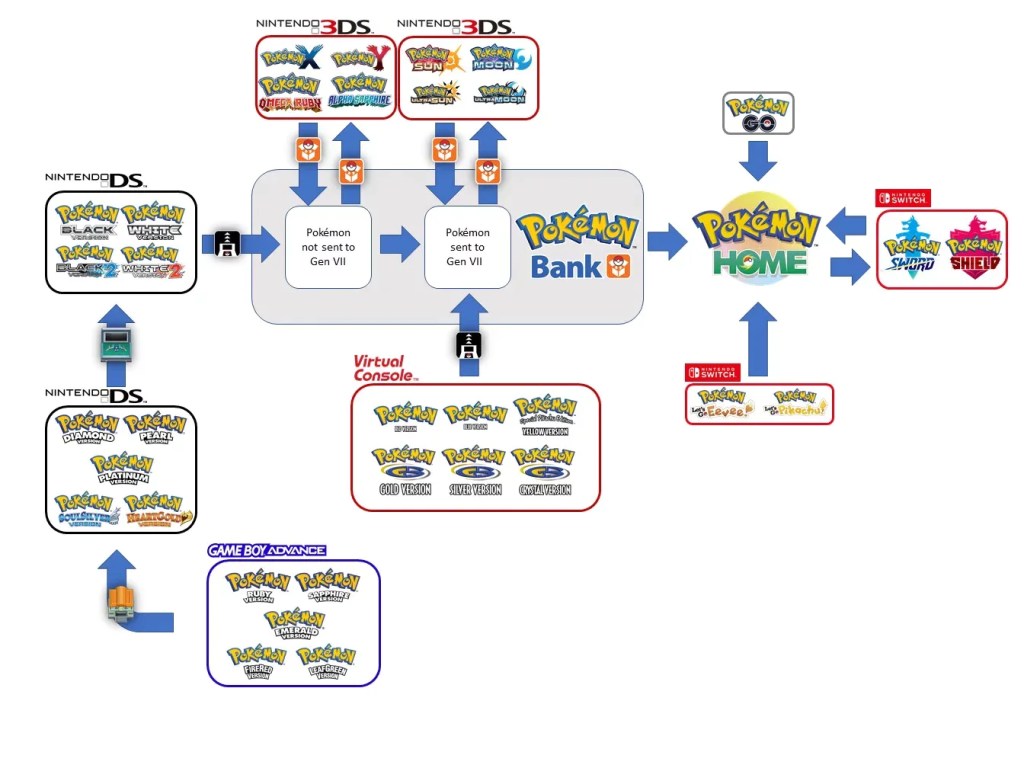
Generation III Transfer
So. Let’s get to the Generation III transfer process! Here is what you will need: A Nintendo DS with a GBA slot, a Generation III game (R/S/E or FR/LG), a Generation IV game (D/P/P or HG/SS), and you need to have advanced far enough in your Generation IV game to have obtained the National Dex to open up Pal Park. Once those items are in place, here is the process:
- Make sure the games are in place: The GBA game is in the GBA slot and the DS game is in the DS slot (duh).
- Start the Generation IV game and when you get to the menu, you should see a new option titled “Migrate from (whichever game you have in GBA slot)”. Select that option and then select six Pokémon you want to transfer into your Generation IV game.
- Leave the transfer menu and start the Generation IV game. Once in game, head to the Pal Park.
- Once you arrive, you will be asked if you want to capture the six Pokémon you just transferred into the game using special “Park Balls” (don’t worry– there is a 100% catch rate).
- Once captured, the Generation III Pokémon are now in your Generation IV game.
A few points to note: Only six Pokémon can be transferred at a time using this method. In Diamond, Pearl, and Platinum, you are only allowed one transfer every 24 hours so it is advisable to use HeartGold or SoulSilver as there is not limitation in those games.
Generation IV Transfer

The Generation IV transfer process is also just as involved as you have to again transfer between games. In this case, you will need an additional DS system (DS or 3DS– doesn’t matter). Once you have both DS systems with games in their respective slots, here is the process:
- In your Generation V game (B/W or B2/W2), head to the Poké Transfer Lab on Route 15
- Once inside, in the very back of the lab, speak to the scientist to begin the transfer
- On the DS console that has your Generation IV game, select “DS Download Play” via the main menu. After a few seconds, your Generation V game will display: “Poké Transfer ID: (your number)”, select that to proceed.
- After about a minute or so (sometimes less), you will be taken to a Generation IV PC (in your Generation V game) where you will be asked which six Pokémon you want to transfer. (Note: you cannot transfer “Spikey-eared Pichu” or Pokémon that know HM moves.
- Complete the mini-game that follows.
- After the mini-game it will confirm that you want to transfer these six Pokémon, say yes.
- You will again be give the option to transfer six more Pokémon via the same process.
- Once you’ve finished transferring all Pokémon you want, head back to the scientist in Generation V game to officially complete the transfer.
Now that you have transferred all of your Poképals through the generations, you can now play with that Mudkip you caught generations ago! Happy transferring!


 porygonpress.com
Leave a comment